CoWorkflow
Claude Cowork Plugin

Your apps. Your routine.
Connected by Claude.

You use 8 apps every day. None of them talk to each other. CoWorkflow connects them through Claude - tell it your tools and describe your workday. It builds automations that run on your schedule. No coding. No config files.

55+ App Connections
82+ Ready-Made Automations
Built Around Your Routine
Works Across Sessions
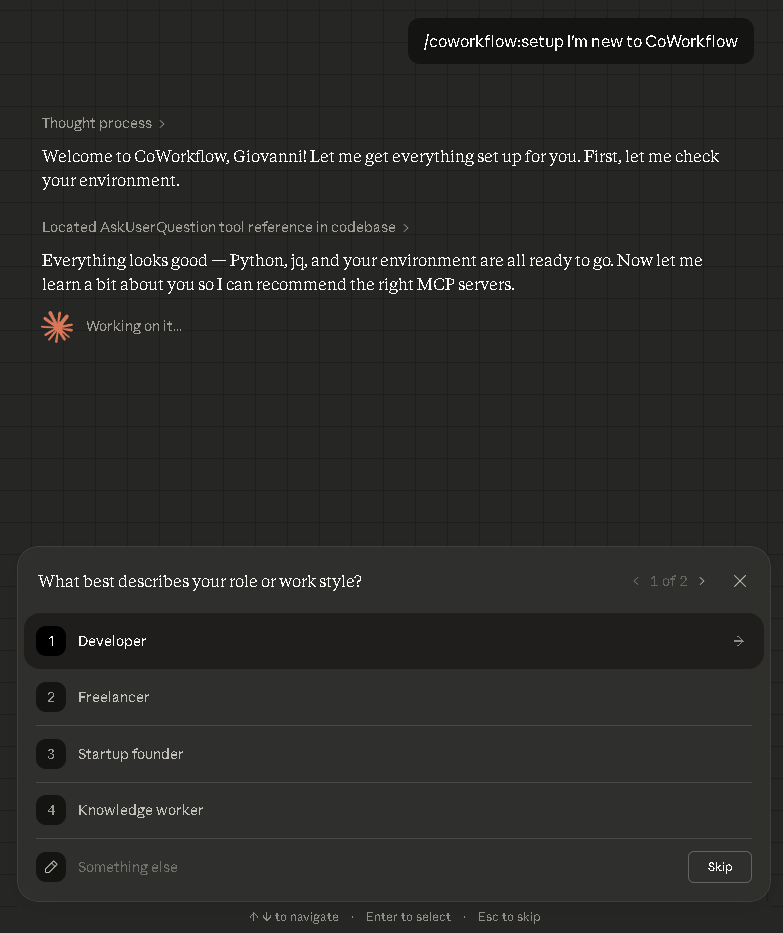
CoWorkflow running in Claude Cowork
Real screenshot - CoWorkflow asks about your workflow and builds automations for you
55+
App Connections
82+
Automations
70+
Apps Recognized
3 min
Setup

Tell Claude your apps. Describe your day. Done.

CoWorkflow asks three questions - your role, your tools, and your daily routine. Then it builds automations that fit how you actually work. You still connect each app, but CoWorkflow walks you through every step.

1

Buy and download

$9, instant download. You get the plugin zip in your receipt immediately.

2

Add to Claude Cowork

Click + Add Plugin in Claude Cowork and select the zip. Say "set up CoWorkflow" and it walks you through everything.

3

Get your automations

CoWorkflow asks about your routine, finds connections for your apps, and builds automations you can run daily, weekly, or on demand.

This is what it looks like

Real conversation with CoWorkflow inside Claude. Tell it your apps, get automations.

claude.ai — CoWorkflow session
you: /my-apps I use Gmail, Slack, HubSpot, Notion, and Stripe

Scanning 70+ known apps...
Matched 5 of 5:

✓ Gmail ........... google-workspace MCP (OAuth2)
✓ Slack ........... slack-mcp (Bot token)
✓ HubSpot ......... hubspot-mcp (API key)
✓ Notion .......... notion-mcp (Integration token)
✓ Stripe .......... stripe-agent-toolkit (API key)

Generated config for all 5 servers.
Credential guide ready for each app.

you: /recipe morning-briefing

Morning briefing for today:
Inbox: 3 urgent emails (2 from clients)
Slack: 12 unread in #sales, 1 mention
Pipeline: 2 deals closing this week ($4,200)
Revenue: $1,840 processed yesterday
Tasks: 5 overdue in Notion

All data pulled live from your connected apps.

Pick your role. See your automations.

Every role gets different automations. Pick yours and see exactly what CoWorkflow builds for your workday.

All 82+ automations included. Just tell Claude "I'm a freelancer, set me up" and it configures everything.

Less than a lunch. More than an intern.

One payment. No subscription. No upsells. Everything you saw above is included.

CoWorkflow

$9once
Download instantly after checkout
  • 55+ app connections (email, calendar, CRM, finance, and more)
  • 82+ ready-made automations you can run with one sentence
  • Asks about your routine and builds custom automations for your workday
  • Finds app connections you didn't know existed
  • Automations persist across sessions - run them tomorrow, next week, forever
  • Works in Claude Cowork - no coding required
Get CoWorkflow - $9

Secure checkout via Polar. Instant download. No account required.

What if the tool you need doesn't exist?

Guardian Forge builds custom app connections on the fly. Describe what you need in plain English, and it creates, tests, and deploys the connection for you. When 55 connections aren't enough, Guardian Forge creates the 56th. See how it works →

Common questions

What is Claude Cowork?

Cowork is Anthropic's collaborative workspace inside claude.ai. It lets you install plugins that give Claude access to external tools — email, CRM, databases, and more. CoWorkflow is a plugin for Cowork.

How is this different from free MCP directories?

Directories list servers. CoWorkflow installs, configures, and connects them into workflows. It includes 82 tested recipes, credential guides, security audits, and an app-matcher that auto-configures your stack. Phone book vs. concierge.

What happens after I buy?

You get an instant download link via email from Polar.sh. Unzip, drop the folder into your Cowork plugins directory, and you're live. Takes about 3 minutes.

Do I need to code?

No. CoWorkflow runs inside Claude Cowork — you type what you want in plain English. "Set up my morning briefing" or "Connect my Gmail and Slack" is all it takes.

What if the app I need isn't in the 55?

The /research command finds new MCP servers from the ecosystem. And Guardian Forge can build custom connections on the fly for anything not covered.

Can I get a refund?

Yes. 7-day money-back guarantee, no questions asked. Email eva.apples1@gmail.com and you'll get a full refund same day.